
Picking a keyboard sounds simple until you sit down to buy one and face the mechanical vs membrane keyboard debate: one promises a crisp, clicky keypress and a board that lasts a decade; the other is the quiet, cheap keyboard that came free with your PC — and honestly, it works fine. So which one deserves your money?
There is no single right answer — it depends on how you type, where you type, and what you can spend. In this guide I open up both designs, compare feel, noise, durability and price side by side, and hand you a decision checklist so you can buy once and stop second-guessing.

How a Mechanical vs Membrane Keyboard Actually Works
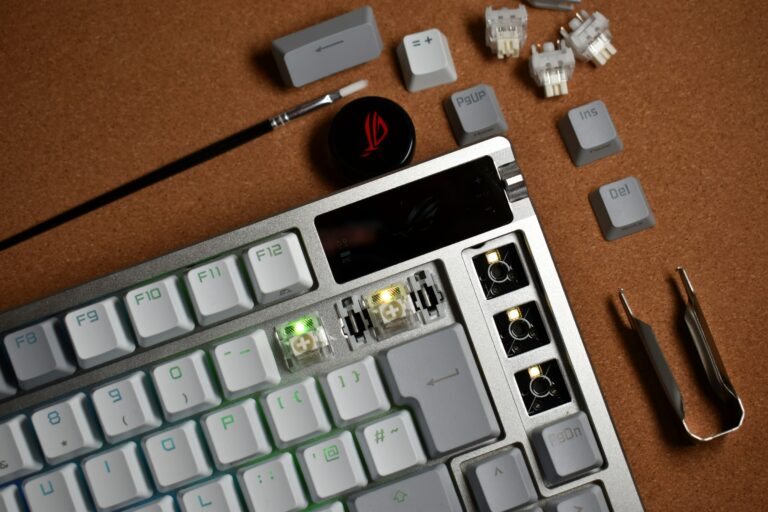
A mechanical keyboard gives every key its own switch: a stem, a spring, and metal contacts under each keycap. Press the key and the stem travels about 2 mm until the contacts meet and the keypress registers — that point is called actuation — and the spring pushes the key back up when you release.
A membrane keyboard works from one shared sheet instead. Three thin layers sit under the keys — two printed with conductive traces, separated by a spacer full of holes — with a sheet of rubber domes on top, one per key. Press a key and the dome collapses, pushing the top layer through a hole until it touches the bottom layer and completes the circuit; let go and the dome springs the key back up.
Feel it yourself: press a key slowly, halfway down, and hold it. On a mechanical board with a tactile switch you will feel a small bump partway down — the actuation point — and the key has already registered before you bottom out. On a membrane board there is no bump; the key registers only when you squash the dome flat, or not at all. That one test tells you most of what you need to know about the mechanical vs membrane keyboard divide. Our guide to Cherry MX switches explains the design most mechanical boards are built around, and Wikipedia’s article on the membrane keyboard shows the three-layer construction in a clear cross-section diagram.

Mechanical vs Membrane Keyboard Typing Feel Compared
Typing feel is where the mechanical vs membrane keyboard debate is won or lost — and why most people who switch to mechanical never go back.
On a mechanical board, every keypress feels deliberate: the switch gives you feedback — a bump, a click, or a smooth linear slide — and the key registers before your finger slams into the bottom, so each keystroke takes less force and causes less fatigue over a long session. You also get a choice — light linear switches for gaming, tactile switches for typing, clicky switches if you like the sound — and our guide to tactile switches explains the middle-ground option most first-time buyers end up happiest with.
On a membrane board, every keypress feels the same: a soft, slightly mushy squash to the bottom. With no actuation point to feel, you have to bottom out every key to be sure it registered, and that extra impact adds up. New rubber domes feel acceptable — even pleasant, if you like a soft landing — but they wear unevenly. After a year or two of heavy use, the keys you hit hardest (spacebar, E, backspace) feel softer and less responsive than the rest, and a single worn dome cannot be replaced.
Try this before you decide: type the same 500-word email on both boards — borrow a friend’s mechanical keyboard, or test one in a shop — then ask: did my fingers feel tired? Fewer typos on one board? Did I check the screen to be sure keys registered? If the mechanical board wins two out of three, your hands have voted. If you cannot tell them apart, save your money.

Mechanical vs Membrane Keyboard Noise Levels
If you share a room with anyone, noise may matter more than feel.
Mechanical keyboards have a reputation for being loud, and clicky switches earn it — a board full of them is heard through a closed door. But “mechanical” does not automatically mean loud: tactile switches are noticeably quieter, linear switches quieter still, and a linear board with lubed switches and rubber O-rings under the keycaps can be genuinely quiet — quieter than some membrane boards. Noise is a choice you make when you pick the switch, not a fixed property of the design.
Membrane keyboards are quiet by default: the rubber dome absorbs the impact, with no metal contact snap and no spring ping — a real advantage in a shared room, but you give up the feedback and switch choice described above.
If you type in a shared space, start with a membrane board or a mechanical board with silent linear switches. If you have your own room, pick the switch sound you enjoy — and test it first.
Mechanical vs Membrane Keyboard Durability and Lifespan
Durability is the mechanical board’s strongest argument, and it is mostly about the numbers.
Quality mechanical switches are rated for 50 million keystrokes or more — Cherry MX switches, for example, carry a 50-million-keystroke rating. Membrane keyboards are typically rated around 5 million per key, and the rubber domes lose their springiness long before the electronics fail. In practice, a good mechanical board survives a decade of daily typing; a membrane board often feels worn after two or three years.
The second gap is repairability: on a mechanical board you can replace a keycap, swap a faulty switch on a hot-swappable board, and lube the stabilisers when the spacebar rattles. On a membrane board, a dead key usually means a dead board — nothing under the domes is user-serviceable. Both types need cleaning, and a mechanical board is far easier to strip down — see how to clean a mechanical keyboard.
Count your daily keystrokes: a heavy typist hits 8,000–10,000 a day; a casual user maybe 2,000. At 10,000 a day, a 5-million-keystroke membrane rating is about 500 days per key — and your spacebar gets far more than its fair share. At that pace, a membrane board is a two-year purchase and a 50-million-keystroke switch a 13-year one. If you type for a living, durability alone settles the mechanical vs membrane keyboard question in favour of mechanical.
Mechanical vs Membrane Keyboard Price and Value
A decent membrane keyboard costs $10–$30, and many people never pay for one — it arrives in the box with the PC. A mechanical keyboard starts around $40–$60 and climbs past $150 for premium boards.
In a straight mechanical vs membrane keyboard price comparison, membrane wins easily as a one-off purchase — but over ten years, the gap mostly disappears:
- Membrane route: a $20 board replaced every two years as the domes wear out = $100 over ten years.
- Mechanical route: an $80 board bought once, plus $15 replacement keycaps in year five = $95 over ten years, with the same feel throughout.
The mechanical route only loses if you buy a board you dislike, or fall into the hobby and start collecting switches. If your budget is tight, a membrane board is the sensible buy — and our roundup of the best budget mechanical keyboards under $100 shows how little you need to spend when you are ready to step up.
Mechanical vs Membrane Keyboard at a Glance
| Feature | Mechanical keyboard | Membrane keyboard |
|---|---|---|
| Typing feel | Crisp actuation; switch choice | Soft, mushy; bottom out to register |
| Noise | Varies by switch; clicky is loud, silent linear is quiet | Quiet by default |
| Durability | 50M+ keystrokes; repairable | ~5M keystrokes; domes wear |
| Customisation | Swap keycaps and switches | Almost none |
| Price | $40–$150+ | $10–$30, often bundled free |
| Best for | Typing, gaming, long sessions | Budget, quiet offices, casual use |
Mechanical vs Membrane Keyboard for Gaming
For gaming, the mechanical vs membrane keyboard comparison tilts hard toward mechanical — with one honest exception.
Mechanical boards actuate before bottoming out, so a keypress registers a fraction sooner, and most gaming boards offer N-key rollover and anti-ghosting — every key registers even when you hold down half the keyboard. Try W to run, Shift to sprint, Space to jump and R to reload simultaneously: a mechanical gaming board handles it without dropping an input, while a cheap membrane board may swallow one. Hot-swappable switches let you put a lighter switch under movement keys and a heavier one under keys you hit by accident.
The exception is casual gaming, where the mechanical vs membrane keyboard gap barely matters. Turn-based games, slow strategy titles, an hour of something relaxing — a membrane board keeps up perfectly well, because inputs come slowly, one at a time. Competitive FPS or MOBA players will feel the difference within a week; casual players will not.
Layout matters too: a smaller board frees desk space for mouse movement, which is why FPS players favour tenkeyless or 75% boards — see our keyboard sizes explained guide before you buy.
Mechanical vs Membrane Keyboard for Office Work and Typing
Office work splits the decision down the middle, and the right answer depends on who sits near you.
In an open-plan office, a membrane board (or a silent-switch mechanical board) is the polite choice — nobody wants to sit next to a clicky keyboard for eight hours. They are cheap enough to replace without a procurement meeting, and their low profile suits shared hot-desks.
If you work from home and type all day, a mechanical board is the better tool: a tactile or silent linear switch gives feedback without the noise, lower actuation force reduces fatigue across a full day, and the board feels the same in year five as day one. Writers, programmers and data-entry staff notice this most — they press keys ten thousand times a day, and that is where the mechanical vs membrane keyboard choice pays off.
Mechanical vs Membrane Keyboard: Which Should You Buy?
Take the first answer that fits.
- Buy a membrane keyboard if: your budget is under $30, you type in a shared room, you type lightly, or you just need a spare.
- Buy a mechanical keyboard if: you type for hours daily, you play competitive games, you want a board that lasts a decade, or you want to choose how your keys feel.
- Buy a mechanical keyboard with silent linear switches if: you want mechanical durability and feel but share your space.
- Still not sure? Buy a cheap membrane board now and borrow a mechanical board for a week — your fingers will decide faster than any review.
For most people the mechanical vs membrane keyboard debate ends the same way: they start on membrane because it is cheap and available, then switch to mechanical once typing becomes a big part of their day.
Mechanical vs Membrane Keyboard FAQs
Are membrane keyboards bad for gaming?
Not for casual gaming. They only struggle in fast competitive games where you press several keys at once, because cheap membrane boards can drop inputs (ghosting). For turn-based and slow-paced games, membrane is fine — the mechanical vs membrane keyboard gap barely shows there.
Can you make a mechanical keyboard quiet?
Yes. Choose linear or silent linear switches, add rubber O-rings under the keycaps, and lube the switches and stabilisers — a silenced mechanical board can be as quiet as a membrane board.
How long does a mechanical keyboard last compared to a membrane keyboard?
A quality mechanical board is rated for 50 million keystrokes per switch and often lasts a decade; a membrane board is typically rated around 5 million, and its rubber domes usually feel worn after two to three years of heavy use.
Do membrane keyboards wear out?
Yes. The rubber domes lose their springiness unevenly, so heavily used keys feel softer and less responsive than the rest. Individual domes cannot be replaced — when the feel goes, the board is done.